myHomework is a
free app that students can use on the web on iPads, on iPhones, on
Android devices, and on Windows 8 devices to keep track of their school
schedules and assignment due dates. myHomework syncs students' schedules
and assignments across all of the devices that they use.
On myHomework
students can enter their course schedules in day and time format
(example: History meets at 10am Monday) or in a block schedule format
(example: History meets during block 1 every other day). Assignments
that students enter into myHomework can be assigned a level of priority
in addition to the due date and the assignment description.
2012-11-27
Create Your Own iPad Games on TinyTap
TinyTap
is a free iPad app that allows you to create simple games based on
pictures that you take. The purpose of the games you build is to help
young students (pre-K through grade 4) practice identifying objects and
patterns.To create a game on TinyTap you upload pictures or take new pictures and arrange them into a set. Then select each image to create questions about it. To create your question press the record button and start talking. When you have finished talking select a portion of your picture to serve as the answer. I created a small game about objects in my house. I took four pictures of things in my house. Each question asked players to identify the objects in my house. For example, when a player sees a picture of my kitchen he or she has to identify the tea pot by touching it.
If you don't have time to create your own games or you just want to see what others have done, you can browse the TinyTap Market. In the Market you can find a mix of free and paid games. A few of the free games that your students can play include "Dress for Winter," "Match It," and "Who Is Bigger?"
Applications for Education
TinyTap could be a great app for creating games that are tailored specifically to your students. You could create a game based on pictures of things in your school. Then your students can play the game to practice recognizing things like the school nurse's office and the names of people in the school office.
2012-11-12
How Public Art Engages Communities & Neglected Spaces
Public art, especially murals, are being commissioned throughout
Chicago in several innovative ways beyond the traditional Percent for
Art program.
Artists at Work Forum
November 19, 2012
6:00 - 7:30 pm
Alternative Public Art Initiatives
Chicago Cultural Center, Claudia Cassidy Theater
Admission FREE
More info http://www.chicagoartistsresource.org/visual-arts/node/46369
Artists at Work Forum
November 19, 2012
6:00 - 7:30 pm
Alternative Public Art Initiatives
Chicago Cultural Center, Claudia Cassidy Theater
Admission FREE
More info http://www.chicagoartistsresource.org/visual-arts/node/46369
Did you Know ?
Watch the serie of videos "Did you know?" realise how the world change.
Did you know 2.0
Did you know 3.0
Did you know 4.0(It is about the boom of technology)
Did you know 2.0
Did you know 3.0
My E-book
My Ebook is a new service for creating rich multimedia ebooks. My Ebook
allows users to create ebooks that contain text, images, and videos on
each page. My Ebook users can create ebooks from scratch or upload
their existing PDF files to display in a book format. When starting an
ebook from scratch on My Ebook,
users can import images from their Flickr, Facebook, Picasa, and
Photobucket accounts or upload new images directly to My Ebook. If you
don't have any digital images you can select some from My Ebook's
gallery. Videos can also be embedded into the pages of My Ebook. My
Ebook provides a good variety of themes and templates to give each ebook
a different look and feel. Ebooks created using My Ebook can be embedded into blogs and websites or shared via email.
Flip Snack - Add Page Turning Effects to Your PDFs
Flip Snack is a free tool for turning your PDFs into ebooks with page turning effects. To use Flip Snack
you have to create an account. Once your account to create a page
turning display of your ebook you simply need to upload your PDF and
select the color, style, and size of display that you desire. The free
version of Flip Snack allows you
to embed your document anywhere you like, Tweet it, email it, and post
it on Facebook. The premium version of Flip Snack allows you give people
the option to download your document. You can see my Flip Snack
document below.

Applications for Education
Flip Snack doesn't change the way students write or that teachers teach. What Flip Snack does do is provide a nice way for students to show-off their work in a visually appealing format.
Applications for Education
Flip Snack doesn't change the way students write or that teachers teach. What Flip Snack does do is provide a nice way for students to show-off their work in a visually appealing format.
2012-11-04
Online safty_ Own Your Space
Free download from:
http://www.ownyourspace.net
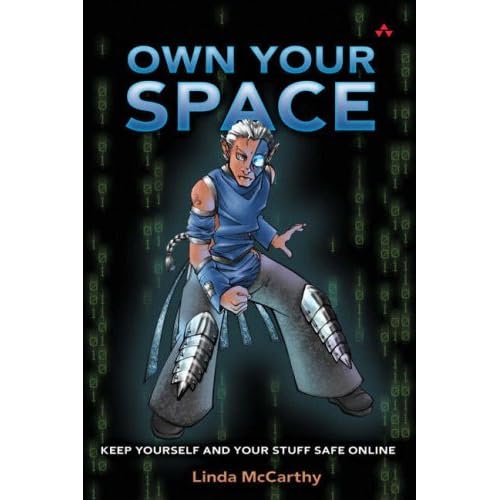
http://www.ownyourspace.net

The book for teens that every parent should read!
You
have been immersed in the technology since preschool. You download
music, Google your homework, and constantly IM your friends. You check
your email before dinner, tweak your MySpace page, and bypass that
hardcopy diary for your own 31337 space in the blogosphere. While you’re
doing that, you also need to protect yourself. This book is about
keeping safe—protecting your data, your identity, and yourself without
giving up all the great stuff the Net puts at your fingertips.
Learn how to
- Kill viruses, worms, Trojans, and spyware
- Give Spam the curb and smash web bugs
- Understand just how public your “private” blogs are
- Keep wireless freeloaders off your network
- Safeguard your parents’ credit card and financial data
- Understand what tools you need and how to tweak them
Linda McCarthy is
a Security Architect in the office of the CTO at Symantec. Linda has
been in the security field for over a decade, and has broken into
systems around the world to show executives how easy it is to break into
their networks. Linda has published seven books on computer security,
and is the author of IT Security: Risking the Corporation. Linda also
received the Woman of Influence Award in 2004 for computer security, a
prestigious award given annually to only four women in the world.
A
portion of the proceeds from this book have been designated by the
author for nonprofit work to educate teens about Internet security.
Acknowledgments
About the Author
Preface
Chapter 1: Know Your Villains
Chapter 2: Drive-By Malicious Code
Chapter 3: Data Grabbers and Dumpers
Chapter 4: Spy vs. Spy
Chapter 5: Giving Spam the Curb
Chapter 6: Pretenders and Pirates
Chapter 7: Phishing for Dollars
Chapter 8: Taming the Cookie Monster
Chapter 9: Safe Cyber-Shopping
Chapter 10: Private Blogs and Public Places
Chapter 11: Any Port in a Storm
Chapter 12: Look Pa, No Strings!
Chapter 13: Protective Tools
Chapter 14: Tweaks
Appendix A: A Check List for Mom and Dad
Index
How to Create Self-Graded Quizzes in Google Docs
Applications for Education
Grading
quizzes can be a tedious task if you have many students on your roster.
Creating and administering quizzes through Google Documents forms can
save you time and save paper at the same time. By saving time on grading
you can give students feedback quicker than before.
Video Explanations of Why We Change Our Clocks This Weekend
Subscribe to:
Comments (Atom)


